Showing posts with label Close to My Heart - Art Philosophy. Show all posts

Wednesday, January 21, 2015

Cricut Expression 2 Video Tutorial Series

Hey Cricut Lovers!

Around two and a half years ago (May 2012) I started a video series on the Cricut Expression 2. It is an amazing machine... but I happen to think ALL of the Cricut mahines are amazing. So what sets this machine out from the rest?


Well...lets start from the beginning. I started my love of Cricut machines with the very first introduction at the Summer CHA in Chicago back in 2005. Over the years I've purchased each new machine. The only Cricuts I have not owned are the Cricut Cake and the Cricut Mini. As a proud and very excited new owner of the Cricut Explore I can say there are definitely some advantages of the Cricut Expression 2.

I was reading some comments on my YouTube videos today and one thing popped out at me. I have several friends that love the Cricut. And many that are not computer.... savy... I guess you'd say. They have no desire to learn about Cricut Craft Room or Design Space. And as some comments show... there are still many crafters that don't want to be connected to the internet or a computer. For this reason I believe that the Cricut Expression is very special.
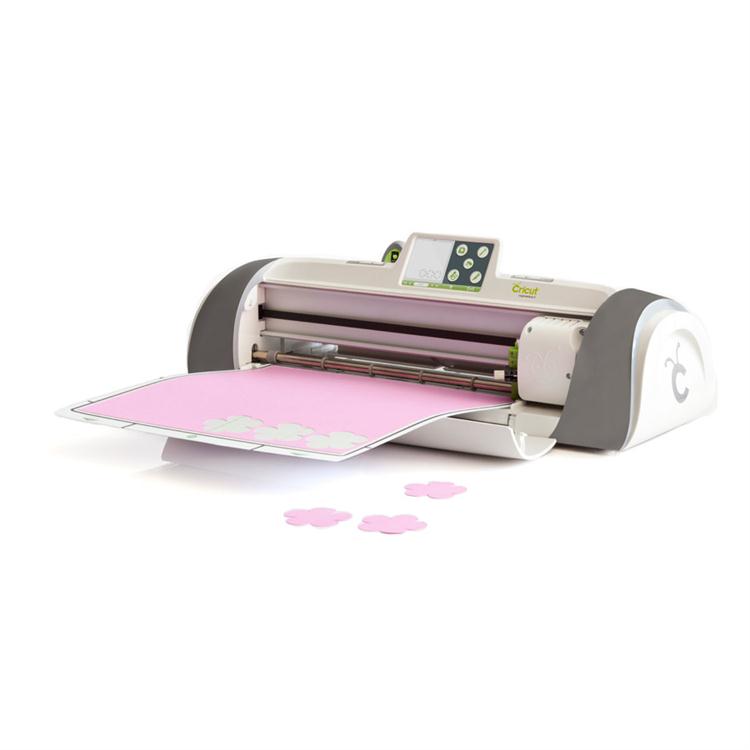
Personally... I'm in love with my new Cricut Explore. I LOVE LOVE LOVE it!!! It's absolutely amazing. But the Expression 2 is also pretty amazing. The E2 has many capabilities all by itself. No need for a computer or internet access. Don't get me wrong... plug that puppy into a computer and use Cricut Craft Room with it and your definitely going to have a multitude of more options. But not everyone wants to be connected. And... being able to unplug from the internet and computer allows you to take your machine to crops, friends house and other events. I also have some friends that live in places that their internet is limited. So they need to have the ability to disconnect. The E2 is the perfect solution. 

So lets get back to my video I created back in May 2012. If you are a subscriber to my YouTube channel you'll find many more videos on Cricut Craft Room than the E2. But even after creating that first E2 video that long ago... it's still relevant today. ALL of my Craft Room videos are now out of date due to updates to the software. But there are no updates to the E2 that change anything. So today the 2012 video is just as relevant. 

Many people have learned about Cricut and ran out and purchased the  machine. I hear way too many times that they have never used it or used it once or twice. Most of the time.. it's just simply because they don't know how to use their machine. This is precisely why I started making videos about Cricut. I have had an early love for the Cricut Bug and I wanted to share my excitement. I wanted to create videos that would empower my fellow crafters to make the  most out of their investment and get these amazing machines into action. 

In this series I wanted to start with the basics. But I did use a cartridge that really stood out to me as one of the best cartridges I owned. That is Close To My Hearts Art Philosophy Cartridge. 


This cartridge has so many possibilities. But where I started was from the cartridges handbook. In every Cricut handbook there is a starter project. And that's what I used for my tutorial. It's actually a great project to start with. It's simple yet has elements of paper, stamping and 3D projects. The roses are so fun to make. 


So...here is the video series that I started all those years ago. Nothing has changed. This is the original video from May 2012. I hope you will learn the basics of the machine and be able to start using it. 

You can click HERE to take you directly to my YouTube channel to all three videos or click on each individual video below. 


In Part 1 I go over the basic functions of the CE2. Here you will learn what each button does. 


In Part 2 we take what you learned in Part 1 and put it into action. We actually take the lessons we learned in the first video and create a project so you can actually make something. 


In Part 3 we actually have cut all the project pieces from the 2nd video and will assemble the card. Most of this video is just basics of card making. But the making of the 3D flower is very helpful on this project.  


I hope you enjoy these videos and that you will get your machine out and create!

Happy crafting!

Tuesday, January 20, 2015

Cricut Expression 2 Video Series... Part 3

Hello my Cricut family. Just a quick post here. I'm so glad to finally get this Part 3 of the Cricut Expression 2 video series uploaded to YouTube. It's been a long time coming. Now that I got that all taken care of I can finally get on to more videos. I think there is a lot more we can still learn about the CE2. I look forward to sharing more videos with you.

I am excited to bring a new video series to you as well.... the Cricut Explore Series is coming soon!!! Do you  know what that means??? Yep... I got one for Christmas. YEAH!!! And I absolutely LOVE it. But... I love all my bugs. So I won't be abandoning any of them. This is going to be an exciting year.

Here's your video. Hope this series inspired you to get your Cricut out and make something. 

Happy Crafting!!!

Wednesday, November 26, 2014

Cricut Expression 2 Video Series PART 2… FINALLY!

Wow! You may recall that a while back I FINALLY was able to get my iMac working. I spent several days on the phone with Apple Support and was able to fix a lot of issues I had been having. There were multiple issues but basically the thing just wasn't working right. With issue after issue I just walked away from it and stopped using it. It was the computer I used for my blog and for editing videos… so after that my ability was limited. As far as videos were concerned… I was done. I had no way of uploading and editing videos. I had actually already made a video on the Cricut Expression 2. I absolutely love Cricut Craft Room, but I also realize that not everyone has access to a computer or even wants to work that way. I made a video and divided it up into three parts. I was able to successfully upload the first one. However… thats as far as I got. At least… till I got my iMac working. While sorting through the files and deleting junk… I found the other videos.

If you watch my CCR videos… You'll notice that they are somewhat outdated. I taped them when there was a previous version of the software. The E2 video doesn't rely on any software on the computer so it is still very relevant.

So here it is… FINALLY!!!!

Cricut Expression 2 Video Series - #2 The Basics (Part 2)


I hope it's helpful. I appreciate your patience. :)

Part 3 will be uploaded soon. 


Thursday, February 13, 2014

Fun Projects with Cricut Craft Room and Vinyl

Yesterday I posted about this week's Free Cut in Cricut Craft Room. You know how much I love CCR. I wanted to share some signs I made not too long ago. I made quite a few for Christmas gifts. I love making them. I get to use my Cricut, CCR and play in my wood shop. Can't go wrong there! :)

So here are a few that I did.


Along with My Cricut Closet I also do woodworking. It's something that I've always dreamed of doing and just been able to accomplish over the last year. It's a lot of fun... and even more fun when I get to use my Cricut on my wood projects.

To start I had a 1x3 poplar board that someone gave me for FREE. (Gotta love that!). I cut several pieces down to a size that looked appealing to me. No special measurements. Plus I had a few scraps laying around that I also used. I spray painted them all black. The larger pic "something good's...." was an old cabinet door that I trimmed down.

(I shared this pic in a previous post... but I hadn't completed all the signs)

I used Cricut Craft Room to type up the words I wanted to use. I have a video on using text in CCR. While this video was made a while ago and some features have been updated in CCR... the basics are still the same. Here's a link.

So using CCR I added my text and welded the letters together for the cursive words... Faith, Hope, Love, Joy. I used Gypsy Font for those. For PRAY and FAMILY I used Close to My Heart - Art Philosophy. That is truly one of my favorite cartridges. LOVE IT! I also used Art Philosophy for the longer saying. I used CCR to place my text on the mat the way I wanted it to look on the board. 


Ok. So you may be wondering what I did here. This was a special order for a Christmas present for one of my friends. She called me up and asked me if I could make a sign saying this. It was something special to her and her mom. Her grandpa used to sing it to her mom and to her. I created a new file and started by using Cricut Craft Room Basics. She had given me an idea of how big she wanted the sign. So I added a square at the dimensions she requested and colored that Layer black. I then added  a second layer with my text and colored it white. I did this so I could see what it would look like. 
Next I played with it. Originally I just added the whole saying as one text block. Then I started over and added each word as it's own text block and moved them around resizing them till I had what I wanted. 

Next step... after getting all the text the way I wanted them... I cut them using my Cricut Expression 2 and some Vinyl. They came out just as I wanted them to. 


So all the white lettered signs were done with the Vinyl. I applied the vinyl and then used some Mod Podge to seal it so that they would not come off down the road. I used the transfer sheets to get them aligned. Also... when I couldn't find my transfer paper I had a roll of clear contact paper that worked just as well. 


The red words were done differently. I love the look of the vinyl but I also wanted to try something else as well. After removing the letters I kept the negative and I used these as stencils to paint on the other blocks. Worked great. Now you could certainly do some sanding and make them look distressed, but I chose to leave them as they were. The painting took a little longer but it was still super easy. 

The "Family" sign I added an extra step. After painting it black I used some red spray paint and painted it a deep red over the black and then lightly sanded it randomly and added black vinyl letters. I like the way it turned out. Here is a closer shot of it, as well as some more pics. 


Just one last note. I mentioned which fonts I used for each of these. If you look at them and think that they don't really look like those fonts... I squished and stretched and manipulated the text in CCR. So they may look a bit different. Just another feature about CCR that I love. You can manipulate images and text until you get the look that you want. :)

Hope you enjoyed these and that it inspired you to make some vinyl signs of your own. As always.. I'd love for you to share your creations with me.